Previously, when visits were uploaded to Sandata, we would only include one address when uploading “client” information. The address from the clients contact screen.
Note that your contact screen may look different as it is custom for each organization.
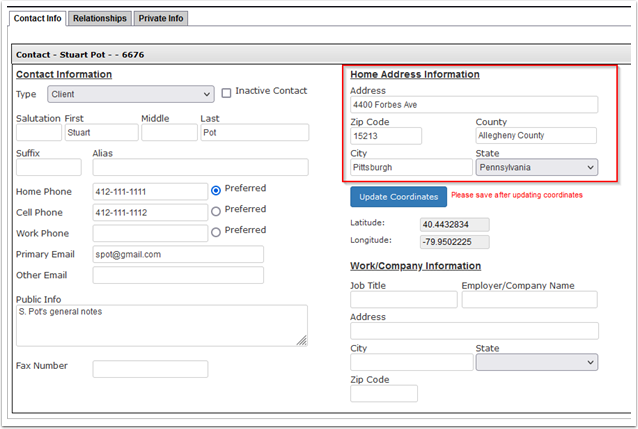
We will now allow multiple addresses to be uploaded when client information is uploaded to Sandata. To support this change, a new form was added to the “Administration” department. The “Client Address Management” form.
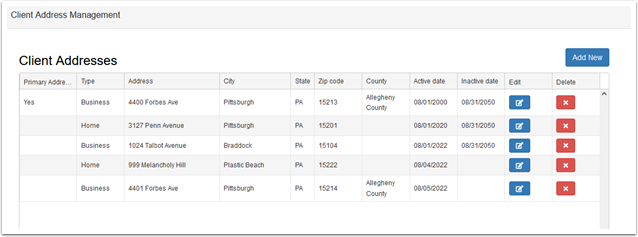
This form will allow you to record multiple addresses for a contact. Any addresses not marked as the primary address will be uploaded as secondary addresses to Sandata. Click “Add New” to add a new client address.
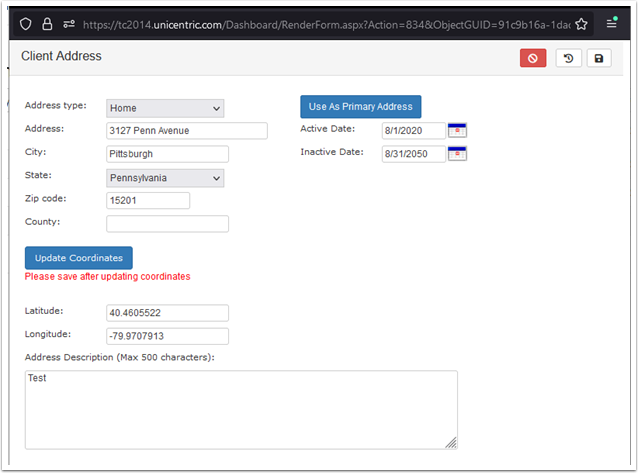
After filling out the address information, click “Update Coordinates” to auto populate the “latitude” and “longitude” fields (or you can manually enter/adjust those values.)
The “Use As Primary Address” button will update the clients contact screen to use the currently open address as the primary address. This address will also be uploaded to Sandata as the primary the next time the client information is uploaded.
Finally, the “Active” and “Inactive” dates can be used to denote that an address was only active as of a specific time.