With the recent (as of April 2022) updates to Sandata’s third-party EVV Vendor specifications, we are now required to provide a “Visit Location Type” with a value that is either “Home” or “Community” for visit records to Sandata. To identify the visit location type, we look to the “Location” associated with the visit (either the location associated with the check-in and check-out, or the location associated with the billing record if a check-in/check-out is not present).
Once we have identified the location associated with the visit, we will check if the “Location Name” is either “Home” or “Community”. If so, we will provide the corresponding Visit Location Type to Sandata (1 for “Home” and 2 for “Community”)
If the “Location Name” we identified is not “Home” or “Community”, we next check if the Location is mapped to a list entry within the “Sandata Location Type Mapping” OtherList. To add a new VisitLocationType mapping …
1. In “List Maintenance” -> “Locations”, Find the location code that you would like to add a mapping for. Copy the “Location Code” (not the “Location Name”)

2. Next, in “List Maintenance” -> “Other Lists”, find the “Sandata Location Type Mapping” and click on the list.
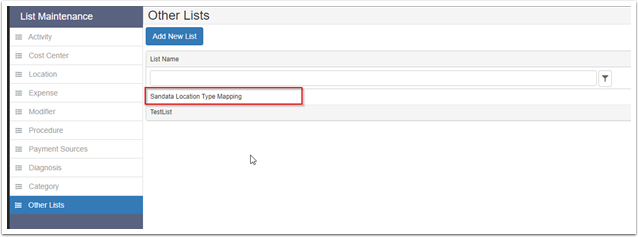
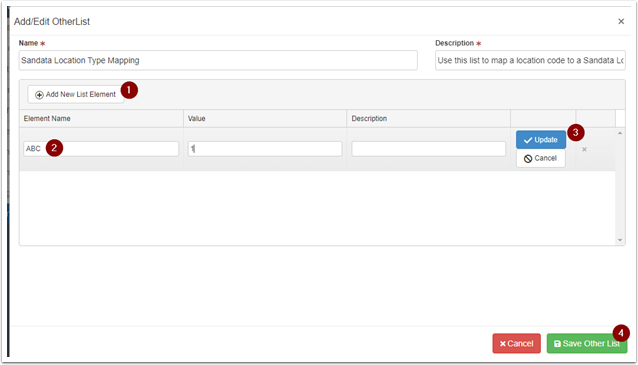
3. Click “Add New List Element” to add a new mapping.
- In the row that appears, enter the “Location Code” that you copied from step 1 into “Element Name”.
- For “Value” enter 1 if the Location should be mapped to the “Home” visit location type and enter 2 if the Location should be mapped to the “Community” visit location type.
- Finally, click “Update” and then “Save Other List” to finish setting up the mapping.
If a mapping is present for the location that was identified, the “Value” provided within the mapping will be the value that we send to Sandata for “Visit Location Type”.
Note that if the name of the location is not “Home” or “Community” and no mapping is found for the location, we will send a default value of “1” (Home) as the Visit Location type.